Yep, I'm pretty old school in a number of ways :-). I still remember ribbon typewriters and what a pain they were to use when (not if) you made a mistake. This cute image and sentiment are part of a set from Hero Arts.
Showing posts with label Epiphany Crafts. Show all posts
Monday, December 3, 2012
Are You Old School?
Yep, I'm pretty old school in a number of ways :-). I still remember ribbon typewriters and what a pain they were to use when (not if) you made a mistake. This cute image and sentiment are part of a set from Hero Arts.
Thursday, September 22, 2011
Washing Day
It's Washing Day (Stamping Dragon Designs image) for Yoo Hoo and his paper pieced quilt will be all nice and fresh smelling after drying in the sun. I pop dotted the bottom edge so it looks like it's blowing in the cool breeze. The patterned paper is from Basic Grey and the buttons were made with Epiphany Craft's button studio tool.
You still have a week to join the current Stamping with the Dragon challenge. Visit the other design team members and see what they have to inspire you today too.Copics used: G03, G05, G07 Y02, Y08, B14 B00, B12, B21, B41, B34, B66, B95 E08, E09 C1, C2, C4, Y00, Y11
Thursday, July 21, 2011
Crafting Scarlette
Today's challenge theme at Stamping with the Dragon is a Recipe: 3 patterned papers, 3 embellishments, and 1 border. The sponsor is Bugaboo Stamps and the prize is 7 digis from their store (winner's choice).
We were given quite a number of choices and I finally decided on Crafting Scarlette. She's all ready to join here crafting friends and scrap and make cards till she drops. Scarlette even uses Copic markers - how cool is that?
The patterned papers are from the Mod Retro Stack by DCWV, the three embellishments were created using my Epiphany Crafts Shape StudioTool Round 14 with their epoxy bubble caps and the border is the Border Carnivale die from Cheery Lynn Designs. If you haven't tried these dies, you really should! Scarlette is colored with Copic markers and her dress, apron, shoes, and scrappy bag are all paper pieced. I used Spellbinder's Deckled Rectangles Small (#4,5) to cut out the image and the mats and I distressed the background with Tumbled Glass Distress Ink. The sentiment is actually one of the papers in the Mod Retro Stack that I cut down to make my card base.
You have until August 4th to upload your Recipe project to the Stamping with the Dragon blog. Visit all the other design team members to see their recipes too - you're sure to find some creative recipes you can "borrow" :-) .
Copics used: E000, E00, E01, R20, R29 T2, T3, B28, RV19, YR04, Y13 E37, E33 YR18 C3, C4 NO, N3
Thursday, July 7, 2011
Ella at Peace
I have two posts for you today. So be sure to keep scrolling down to see the other one. Thanks :-)
The theme for the AiFactory challenge this week is Double Time (use two of something on your project). My image is Ella at Peace and I did two different Doubles: the embellishments on either side of Ella and the two rows of patterned paper behind her.
Ella is colored with Copic markers and the mat was created with a product called Magic Matter Disk Set that I've had since I began scrapbooking eons ago. (To be honest, I wasn't sure they still made it.) It was designed to make mats for your photos, but I use it quite often to make mats for my images that I fussy cut out. The embellishments on either side of Ella were created using my Epiphany Craft's Shape Studio Tool Round 14 and bubble caps. The patterned paper is from Echo Park's For the Record collection.
You have until next Wednesday, July 13 to upload your Double Time projects to the AiFactory Challenge Blog. As always, you are welcome to enter as many times as you like as long as you make a new entry each time. No back linking please. You don't have to use an AIF image but we certainly would love it if you did. You can find some great ones in our store. While you are there, be sure to visit the other design team members and see what they've created for you too.
Copics Used: E00, E01, E11, R20 BG23, BG32, BG34, BG45, R22, R43 Y02, Y04, Y06, Y08, R20, R43 YG11, YG61 E13, E15, E17 B0000
Thursday, March 3, 2011
Jiggy's Pot of Gold - SDD Challenge
CHALLENGE: USE THE COLORS GREEN/YELLOW-GOLD/WHITE OR ST. PATRICK'S DAY PROJECTS.
PRIZE: 2 DIGI'S TO THE WINNER FROM TIFFANY'S DOODLES
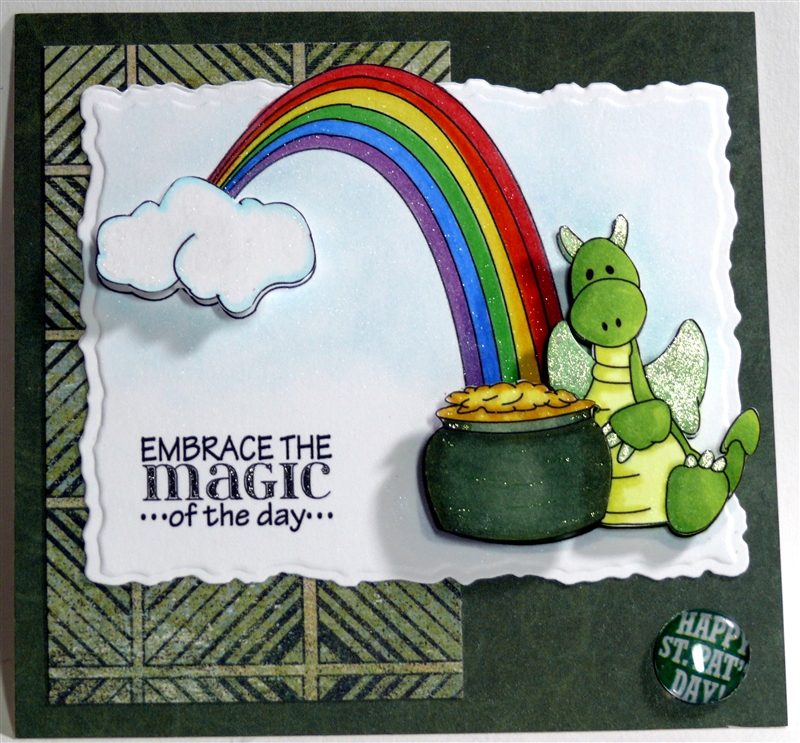
I chose Jiggy's Pot of Gold and colored him with Copic markers and Spica glitter pens. The sentiment is from Create with TLC. I printed the image out twice so I could add pop dots for more dimension. Both Jiggy and his pot of gold are pop dotted; I used a taller pop dot for the pot of gold so it would be in front of Jiggy. I also pop dotted the cloud.
I cut the main image with Spellbinders large deckled rectangles (#5), using the out of the box technique. I also created a little brad using my Epiphany Crafts shape tool and button caps. Here's a close up for better details:
Be sure to visit everyone on the design team and check out their creations as well. (See page tabs above for blog addresses.)
Copics used: Y26, Y15, Y11, Y00 G94, G99 YG11, YG13, YG21, YG23, YG 25 R14, R17, YR07, YR09, Y13, Y15, YG07, YG09, B24, B26, V15, V17
Sunday, February 20, 2011
Timeless Classic

My challenge to everyone is to make your own stamped metal accents. I used this technique in two different places on this tag: the gears and the hub caps.
I found this great video at Hero Arts that shows you how simple and easy these are to make. I ended up making 6 layers, instead of the 4 that was recommended on the video for the gears (my base is larger than the one in the video though). Here's a close-up of the gears metal accent:
Using this same metal accents technique, I also made my "metal" hub caps for this antique car. I created the hub caps using my Epiphany Crafts round shape tool 14 and bubble caps.
I also experimented with a different technique. I used my colorless Art Masking Fluid (which I've used before) to mask the car. After that dried, I applied my Versamark pad over the entire surface of the tag and heat embossed with this cool Denim embossing powder. What I wasn't sure about was if the heated powder would release with the masking fluid. It did! I had to rub a bit harder to get it off, but I'm really happy with the results.
The car is a rubber stamp from Art Impressions and the gears and sentiment are rubber stamps from an older Stampin' Up set called Sense of Time. The oval background for the metal accent was cut with Classic Ovals #3 Spellbinders die. I distressed the edges of my sentiment and hung it with jump rings found in the jewelry aisle of your favorite craft chain.
By the way, Ch{all}enge Masters is looking for several new Divas for the term beginning April 1st through September 30th, 2011. If you are interested, please contact Terri at: terri@challengemastersonline.com for the details!!
I would love to see what you come up with using this fun technique.
Saturday, February 12, 2011
I've got my eyes on you
True Love - monster style. This cutie pie is a digital image from Hambo Stamps and the challenge this week is to use this image plus add an additional heart (or another Hambo image if you didn't participate in the challenge last week). Before printing, I reversed one image so I could have a boy and a girl monster (notice the pearl earrings and bracelet?), each holding a heart. (I got the idea from Tammy - thanks!). Flower Soft (Bright Pink) was used to give the hearts more contrast. I also cut out the sentiment using the Nested Hearts (#1) from Spellbinders, embossed it, and then highlighted the embossing with Distress inks and a glitter pen. Copic markers are used to color the images.
The heart paper clips are made using the Epiphany Crafts Shape Studio Tool Round 14 and heart stickers. Then I attached these to jumbo paper clips that I colored with my Copic marker (R39). These are so fun and easy to make. Here is a close-up of the paper clips. (Epiphany Crafts also has a heart shaped tool, but since I don't own it, I improvised.)
You still have a few days to play along with Hambo Stamps Hoedown Challenge this week. Have fun!
Copics used: BG15, BG32, BG34, BG45, BG49, Y06, Y08, Y11, colorless blender C1. Other ingredients: Mrs. Grossman's heart stickers, Distress Ink (Spun Sugar), pop dots
Sunday, January 9, 2011
My Baby - 1985 Fiero
Let's start off by saying this layout was made for my hubby! This was the first new car he ever purchased, right out of grad school. He was SO proud!
In addition to being the Stamping Diva, I'm excited to also be the new Hybrid Diva for the next several months at Challenge Masters. We have 7-8 new challenges per week and you have all month to submit your projects - and it's free to join. So, what are you waiting for? This is the week for the Hybrid Scrapbooking Challenge.
Since I'm fairly new to hybrid scrapbooking, I did a little research and found this great website, Digital Scrapbook Experts, where you can download scrapbooking elements daily, for free. My challenge to everyone is to incorporate a minimum of two elements from the current month's theme from this site into your layout. I used three different elements from the first seven days - two sheets of paper and the theme title (which I cut up and used certain portions of). I made my own double-sided paper by printing one sheet on one side of cardstock and flipping it over to print the other side.
I also added a couple of other elements to my layout: hand died seam binding ribbon (spritzed with Glimmer Mist until I was happy with the color) and the paper flowers. I really wish I remembered where I saw this great idea so I could give that person credit. They are really fun and easy to make. For the centers of the flowers, I used the Epiphany Crafts round Shape Tool. That way I could coordinate the centers of my flowers with the papers I used in my layout.
Here's a close up of one of the flowers.
So, head on over to Challenge Masters, sign up, and join in on all the fun. It's not just for scrapbookers; there are enough challenges for everyone to feel right at home.
Saturday, December 25, 2010
Saturday, November 20, 2010
RBI Robby: DTD Inspire Challenge
Today is Dude Time Doodle's first Inspiration Board Challenge. This will be held the 20th of every month and here is your inspiration for this month:
The inspiration boards are courtesy of The Craft Begins. Brianna has given DTD explicit rights to use her inspiration boards for these challenges - pretty cool! You will have two weeks to use whatever grabs you for your creation! Be sure to head over to Dude Time Doodles and link your project up with the InLinkz button. Winners will be announced on the 27th.
I chose the baseball as my inspirational starting point. And there's no better dude than RBI Robby from Bonibleaux Designs. (Robby is listed under the Sports category). I used my Copic markers to color him in and cut him out with my Large Deckled Rectangle dies from Spellbinders, using the "Out of the Box" technique.
For the baseball "brad", I used a new tool (to me) called the Shape Studio Tool - Round 14 from Epiphany Crafts. This cool little tool allows you to cut a shape anywhere you want on your piece of paper, allowing instant coordination. Since I didn't own any baseball patterned paper, I went to my computer, found some clip art that I liked, and printed it out. Used the tool punch and then the epoxy covering, and I had an instant embellishment. Very cool! I found the sentiment online and printed it out, Distress inked it, and adhered it.
Don't forget to check out all the other great projects from our Design Team. Now it's your turn to inspire us at DTD! I can't wait to see what you come up with!
Subscribe to:
Posts (Atom)