Showing posts with label Paper Soft Colors. Show all posts

Friday, August 10, 2012

Ladybug, ladybug


The challenge for Pattie's Creations is Anything But a Card....so I made a bookmark using the Ladybug Family image from Pattie's Esty store.

This was so fun and really easy to make.  After printing the image and cutting it out with Spellbinders, I colored the ladybugs with Copic markers and then created a mask for each one.  Next, I applied Viva Decor's Paper Soft Colors (light moss green, moss green) with a sponge dauber to simulate grass and the generously sprayed the whole thing with Goosebumps Texture Spray.  After removing the masks, the ladybugs didn't pop quite enough for me, so I added Glossy Accents to each of their bodies (which dried nice and rounded) and Enamel Accents to their trail of dots.  The tab at the top of the bookmark is another Spellbinder's die, Creative Page Tabs.  I wish you could feel all the texture on this bookmark.  It doesn't feel like paper at all; it's really hard to describe, but it's really cool.

Now, lets see what you come up with for this.  Be sure to see what the rest of the design team came up with to inspire you too.  You have two weeks to upload your creation to the Pattie's Creations Design Challenge.

Copics used: R35, R46, R59, BV29

Friday, April 6, 2012

Easter Dress


It's hard to believe that two weeks have passed by so quickly.  That means it's time for a new challenge from Pattie's Creations and we are celebrating Easter.  As I was looking through all the wonderful images at Pattie's Esty store,  I came across this gorgeous Little Girl Dress.  It reminded me of when I was little and would always get a new dress to wear for Easter services and then the Easter Egg Hunt.  Usually my grandmother made them, making the dresses even more special.

The dress is colored with Copic markers and fussy cut out.  The flower on the dress is a Sizzix die (Flowers 3D) that I cut down slightly.  I thought the Cheery Lynn Designs (Large French Lattice) die looked like one of those grids where clothing stores will display their favorite items.  So I hung the dress on that.  I was very fortunate that the background paper (very old from Creative Memories) matched the colors I had chosen for this.  (I usually do things opposite of most people in that I color my image and then find papers to coordinate.  From what I read, most people choose the papers and then color.  Oh well.)  The sentiment was generated on my computer and then highlighted with Paper Soft Colors (lilac).

You have two weeks to upload your Easter projects to the Pattie's Creations challenge blog.  The rules are posted on the challenge blog, but the main one is that you must use an image (either a rubber stamp or a digital one).

Copics used: E00, colorless blender    RV91, RV93, RV95, RV99  


Monday, March 19, 2012

Chomp


Challenge #28 from the Digi Makeover Challenge team is from an Inspirational photo: spring colors


I thought Chomps, from Paper Makeup Stamps, was just the cutest thing eating a flower.   I've been seeing a number of white on white projects lately and that's what I decided to do for this spring card.

After coloring Chomps with Copics, I fussy cut him out and adhered him to my first layer.  This was actually a piece of junk mail that I had received a few days earlier.  (For once, something useful.)  The background was plain cream, so I added clouds and a sky with chalks.  This is matted onto a piece of white copy paper spritzed with Smooch Spritz (vanilla ice), which looks very shimmery behind Chomps. The green strip is distressed with Paper Soft Colors (lime green) and the brads are colored with Copics to match the pink flower Chomps is eating.  The base cardstock is embossed with leaves, although they are difficult to see.

Head on over to the Digi Makeover Challenge blog to enter your photo inspired project.  Don't forget, you must use a digi and follow this week's theme.  Check out the rest of the design team's creations for lots more inspiration.

I'm entering this in the following challenge: Mark's Finest Papers (CAS).


Copics used: YR00, YR01, YR02, YR07    YG0000, YG01,  R24, R37, R89    YG03, YG45    RV04, RV09, Y02, Y06, G17    B05
Smooch: Gold Lame, Illuminate

Friday, March 9, 2012

Chef Pattieboop


Are you ready for Challenge #39 from Pattie's Creations?  Hope so because it's a fun one: Tags.

Chef Pattieboop was my inspiration for the tag.  You can find this and lots of other images at Pattie's Esty store.  The background was created with Paper Soft Colors (Sunny Yellow) and the image is colored with Copic markers.  The Dainty Dots Border at the top is a die-namic from My Favorite Things and the sentiment is a clear stamp from Stampendous.

Now it's time for you to create a tag and upload it to Pattie's Creations challenge blog.  You'll have two weeks.  Be sure to see what the rest of the design team has for your viewing pleasure too.
Copics used: E00, E01, E11, R20   E51, E53, E55    R05, R08    V17, V25    R02, V12, V15    Y17, R37    E30, E42    B32, B45    T2, T3, T4    E55, E57, E59

Wednesday, February 15, 2012

Lucky Strike


It's that time of the month.  Of course I mean Dude Time Doodles Inspiration Challenge.  Here is the inspiration board plus an added little twist - use dies or punches (die cutting machines qualify too).  Our sponsor is Stamp by Step and the winner will receive a $15 gift certificate to the store.


Lucky Strike, a Bonibleaux Designs digital image from the Dude Time Doodles store, wanted to play in this challenge.  Since we needed to use dies (one of my favorite things to do on a card), I decided to create a scene with different dies.  After coloring Lucky with Copic markers and fussy cutting him out, he's standing on a pitcher's mound created with Spellbinders Deckled Ovals.  His background was created using Spellbinder's Wonky Rectangles and the sun and the cloud are die-namics from My Favorite Things.

The patterned paper behind the scene is actually a page from an old book that I inked up with my Distress Stains to coordinate with the image. The card base is from Core'dinations.

Now it's your turn to be inspired.  You don't have to use a Dude Time Doodles image, but we really appreciate it when you do and remember, it's got to be for a dude.  You have one week to upload your creation to the Dude Time Doodles challenge blog.  Be sure to check out the awesome creations from the rest of the Dude and Dudettes.

Copics used: YR00, YR01, YR02, YR14    BG01, BG02, BG09    E11, E13, E15    E35, E39    E40, E41

Friday, January 27, 2012

Hello Cupcake


The new challenge for Pattie's Creations is embossing.  It's you to you whether you choose to dry emboss or to heat emboss, but you must use a digi or rubber stamp.  (The rest of the rules are posted on the blog for more clarification).

I've chosen the cupcake image from Pattie's Esty store and printed it out on Cryogen text weight paper (it's a lighter weight than cardstock) and colored with Copic markers.  I love using the Cryogen papers because they are iridescent and have a wonderful shimmer to them.

For the background, I chose dry embossing.  First I cut out more Cryogen paper with Spellbinder's Label Ten (#5) and then used the Cathedral Lace Frame die from Cheery Lynn Designs to dry emboss the paper.  I've found that I can use the Cheery Lynn dies, along with their embossing pad, and emboss the design as well as cut it out.  It's sort of like two for the price of one.   I must tell you their embossing plates are fantastic too.  Since I wanted the detail to stand out more, I reached for my Paper Soft Colors (Lilac) and used a dauber to apply the color.  It gives it a nice subtle look to the dry embossing.  Next, I pop dotted the fussy cut image onto the background.  For the sentiment, I stamped the birthday message (The Rubber Cafe) directly onto the ribbon.  I also added some Creative Inspirations paints (light purple) to the mat and card base for added sparkle.

You have two weeks (until 2/9/12) to show us your embossing skills and upload them to the Pattie's Creations Design Challenge blog.  Be sure to check out all the other team members creations too.

I'm also entering this card in the Cheery Lynn Designs (dry embossing) challenge.


Wednesday, December 14, 2011

Season's Greetings


The new AiFactory Challenge is here and the theme is Christmas (easy, easy). For this challenge, each design team member was given the Season's Greeting Christmas Graphic clipart to play with from AiFactory.

Clip art makes completing cards super quick and easy.  But just because you are using pre-colored images doesn't mean you can't add a little something to make it your own.  And that's exactly what I did.  I combined five of the images and printed several of them twice so I could pop dot them for added dimension.  I also added Spica glitter pens to each of the images for added bling.  The background was colored a light cream color from Paper Soft Colors (although it's hard to see it in the photo).  I added a quick sticker to the inside and finished another Christmas card in record time.


Be sure to visit all the design team members to see what they did with this clipart.  Don't forget, you have two weeks to upload your Christmas project to AiFactory Challenge blog.


Also wanted to remind you that there is a design team call going on right now.  You can find all the details HERE.  I'm sad to say that this will be my final posting as an official team member, as I will be stepping down at the end of the term.  But you'll still see some of the wonderful AiF images here from time to time.  Be sure to check out the dt call and don't be afraid to enter.  Good luck to everyone applying.


Monday, December 5, 2011

Moody for Coffee


Since today is Monday, that means it's time for the new Digi Makeover Challenge and this week's challenge is one of my favorite things to do: fussy cutting.


Moody for Coffee from Paper Makeup Stamps was a perfect choice for fussy cutting. As usual, she's colored with Copic markers.  The background was created with a Dreamweaver's stencil that I've had for a long time and Paper Soft Colors.  First, I ran the stencil and cardstock through my Big Shot to emboss the image.  (I didn't know you could do this and was just playing around.  Yea - a happy accident.)  Next, I used Magenta Paper Soft Colors and pounced the raised area (keeping the stencil in place) and finally, went over the entire area with the same color. 


I then matted this onto an orange piece of cardstock which I embossed with a Sizzix Texture Plate (Mummy Stripes).  I must say, this is so vibrant and looks great in person.  I added several gems to complete the card.


Now it's your turn to show us your fussy cutting.  You have until Sunday evening (12/11/11) to upload your project.  Just a quick reminder about the rules:  it has to be a digi and you need to follow the theme (in this case, fussy cutting).  For more detailed explanation of the rules, please visit the Digi Makeover Challenge blog.  While you're there, be sure to check out all the other wonderful design team creations too.

Copics used: YR15, YR16, E23, E25    E00, E01, E11, R20, R14    BG0000, BG01, BG05    YR20, YR31, YR23    YG05, YG07, BG32, BG34, BG05, BG07, G21, G24, Y15, Y18, YR04, YR07, YG01, YG21, Y32, Y38, BG70, BG72, BG75, YR16, YR18, BG11, BG15, YG65, YR68, BG45, BG49, Y15, Y18

Thursday, December 1, 2011

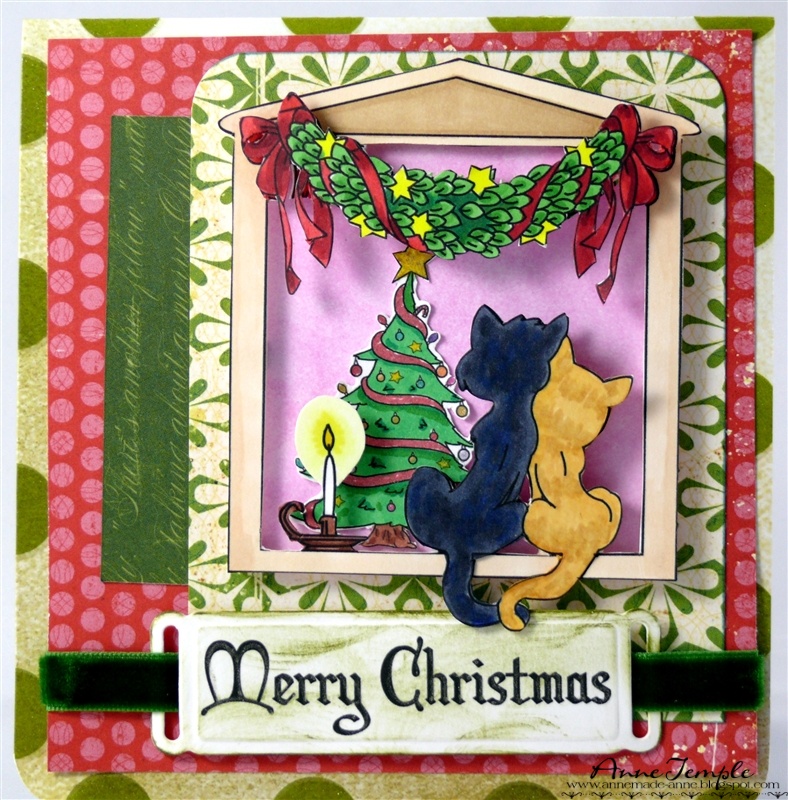
Christmas Window


For this week's Stamping with the Dragon  inspiration, I incorporated three different images from Stamping Dragon Designs: Christmas Window, Oh Christmas Tree, and Christmas 1 Sentiment pack into my design.  One of the things I really love about digital images is the ability to re-size them as needed and that's exactly what I did with the Christmas tree.  I needed it pretty small so the cats (and you) could see it through the window.  The "wall" behind the tree was created using my new Paper Soft Colors (I'm really liking them to create backgrounds).  


As you can tell from these photos, I printed the image a couple different times and fussy cut out the cats, the garland, and the frame separately so I could add lots of dimension to it.  I really wanted it to look like a window frame where the cats are sitting on the window sill looking in at all the wonderful Christmas decorations.

The sentiment is part of a set and is die cut with Spellbinders and distressed with a bit of Distress Inks. The papers are by Echo Park and Making Memories.

You still have a week to enter the Anything Christmas challenge going on now at Stamping with the Dragon.  Don't forget to see the rest of the design team's creations too.

Also, Stamping with the Dragon is having a Design Team call. Head to the challenge blog for all the details.

Thursday, November 17, 2011

Cracked Glass - Lily


Today I wanted to share with you not only a beautiful and versatile image called Lily Sympathy from Stamping Dragons Designs, but also a tutorial on a technique I read about a couple years ago called the cracked glass technique.  (I'm sure if you Google it, you can come up with all kinds of You Tube videos as well.)  First off, let me say that I think this image is good for all occasions, not just as a sympathy card.  That's why I didn't put a sympathy sentiment with it.

The items you will need to complete this technique are a colored image of your choice, Ultra Thick Embossing Enamel (UTEE), VersaMark, heat tool, and a freezer.

Here is my lily after coloring it with Copic markers.  The background was made by first applying a pink shade and then lightly going over that with a lavender shade.  I wanted parts of the pink to peak through.

After you've colored your image and you are happy with it, the next step is to apply the VersaMark to your image.  Make sure it is fully covered.  Next, begin applying the ultra thick embossing powder all over.  (You will eventually apply three layers of the UTEE.)  Once it's covered, you are ready to heat it.  The easiest way I found to do this was to place the UTEE covered image in a shoe box top.  That way, you can easily heat it up without having to touch any part of it.  Using your heat tool, thoroughly heat the embossing powder until it's completely melted.  While it's still HOT, pour a second coat of UTEE over it.  (I had left the image in my box top when I poured the second coat over it.  Once its completely covered again with UTEE, you can take the time to put the excess UTEE back in the container.)  Reheat again until it's completely melted. While it's still HOT, pour the UTEE over it for a third coat and heat completely.

 It should look like smooth glass at this point, as seen here in the photo on the left.  If you like this look, you can stop right here and  begin assembling your card.

To continue to the next step, just place this in your freezer for about five minutes.  Don't worry if it curls; you want it to and it should look something like the photo on the right.


Take it in your hands and start to straighten the image back out by bending it slightly backwards.  It will start to crack where you are bending it.  If it doesn't start cracking (you'll definitely hear it popping), just put it back in the freezer for a couple more minutes.  It should resemble this:


If you don't like the way it turned out, don't worry.  You can fix it by reheating it and melting the UTEE all over again.  Put it back in the freezer and try again.  One final step you could do, but I chose not to, is to slightly distress it by using a sponge dauber and a vintage brown ink to highlight the cracks more.  Rub the excess ink off with a cloth.  Again, I chose not to do this because I was happy with the results without the distressing.  Here is a close up of the assembled card.

For my assembly, first I mounted my image on black cardstock.  I created my background using a Cheery Lynn Designs lattice frame die and Core'dinations papers, which I sanded to bring out the peach.  The purple strip along the side was created by blending in two different shades of Paper Soft Colors to bring out the lavender in my image.  The scalloped border along the right side was created using the Grand 12" scallop Border by Spellbinders.  The peach base is the other side of the Core'dinations paper.

I also want to let you know you still have time to enter the current challenge (the theme is "food for thoughts") going on at Stamping with the Dragon.  You have until next Thursday to upload your project.  Don't forget to check out what the rest of the design team has created for you this week (you can find their blog addresses on my side bar).

I hope you like this technique and will try it soon.  I would love to hear back from you, letting me know what you think of it.

Copics used: YG11, YG13, YG13    YR0000, YR000, YR00, FY1    R27, R29, Y08, RV000, RV00, BV000, BV00


Thursday, November 10, 2011

Cake Makes Everything Better!


Happy Friday everyone (OK, Thursday evening since the dt posts challenges to go live England time).  So that means it's time for a new challenge at Stamping with the Dragon.  The theme of our challenge is FOOD and our sponsor is none other than Bugaboo Stamps.

For my card today, I tried out Paper Soft Colors by Viva Decor to create my background as well as inking in the sentiment.  I must say, they blend really well - it just took a little longer than Distress Inks to get the look I was going for.  Just worked with it a tad bit longer is all, but I do like them.  They are oil based, so the instructions say to let dry for about 30 minutes and you do need a designated sponge with each color.  I tried a few different types of sponges and think I like a sponge dauber the best (although I haven't tried the sponge recommended by Viva Decor since I wanted to see if I could use what I already have on hand before buying something else).  I feel that I have better control over it than when I used a cosmetic sponge or the Ranger Ink Blending Tool and foam pads.

A couple quick details about the card: the image is colored with Copic markers; the sentiment is cut with Scrap-Mart's Label 1 die (#4) and is from Create with TLC; the left edge was cut with Memory Box's Sanibel Border.  On a side note, the purples in the image match the background really well, but turned out bluish in the photos.

You'll have until 11/24/11 to upload your FOOD creation to the Stamping with the Dragon Challenge Blog.  Can't wait to see what types of food you come up with.  While visiting the challenge blog, be sure to check out all the other great creations we made for you - they are a real treat.

Copics used: E00, E01, E11    Y11, Y00, R01, R81, R27    FV2    Y35, Y38    C0, C1, C2    BV13